How to use the download interface
1. Select how to retrieve data
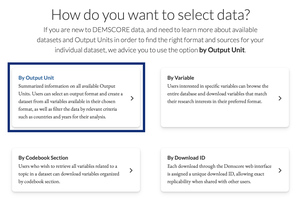
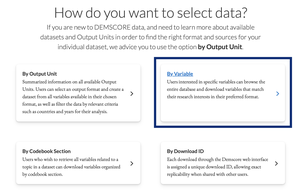
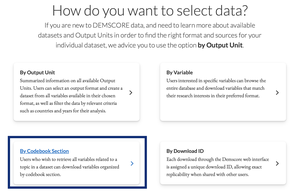
Demscore data can be retrieved from the download interface either by variable, by codebook section, by downloader ID, or by Output Unit.
Users interested in specific variables can download data by variable, and users interested in variables related to a specific topic can download data by codebook section. All variables from all datasets are thematically grouped into codebook sections in a PostgreSQL database. This organization enables the user to easily select all variables across all modules related to their topic of interest available in their Output Unit of interest.
If the purpose of the download is to replicate data, users can download data by downloader ID. Each download through the DEMSCORE web interface is assigned a unique downloader ID, allowing exact replicability when shared with other users.
If you are new to DEMSCORE data, and need to learn more about available datasets and Output Units in order to find the right format and sources for your individual dataset, we advice you to consult the list of Output Units on this page. The page includes information about Output Units available in Demscore, and links to the download interface with the selected Output Unit filled in advance.
With the current setup, a user can generate a customized dataset and accompanying codebook in a matter of seconds. For example, creating a customized dataset with a tailored codebook encompassing 20 variables from ten datasets takes approximately 25 seconds, which is enormously time efficient compared to merging ten datasets by hand.
2. Select main dataset of interest
Note: selecting a main dataset of interest is only applicable when using the option retrieve by variable.
Depending on the selected dataset of interest, you will be suggested the original Output Unit of the dataset, i.e. the unit in which you can keep variables from the chosen dataset in their original form. You can however set the Output Unit to any unit you prefer.
Please note that you do not automatically download the whole dataset when selecting a main dataset of interest. You still need to select single variables (see step 6).
Dataset Unit: A Dataset Unit, e.g., Country-Year, describes the level at which observations for a dataset are collected. Observations are stored as rows in a table. In order to find a specific observation, e.g., information on a specific country for a given year, special table columns are needed as identifiers. Comparable to page numbers in a book, these columns help us find the location of the table row that contains the values for each variable of interest for a given observation i.e., a given country and year. The information necessary to identify these rows may be stored in a single or in a combination of several identifier columns. In the most common example for datasets that have the Country-Year Dataset Unit, the country and year information is each stored in a separate column.
3. Select Output Unit
The selected Output Unit determines the identifiers on which your chosen variables are merged. The Output Unit is recommended based on the chosen main dataset of interest. This is however just a recommendation, it can be freely chosen by the user.
What is the suggestion based on?
If you select the QoG Standard TS dataset as the main dataset of interest, we assume that most of the variables you want to download are from that dataset. Hence, you are recommended to select the QoG Country-Year Output Unit as this is the original unit of this dataset and all its variables will be available in their original form when downloaded in this unit. Variables from other datasets are merged based on the country and year identifiers in the QoG Country-Year unit.
Which Output Unit should I choose?
To choose the right Output Unit, you first need to decide in which format you want to retrieve the data. Demscore offers several formats which includes, but are not limited to, the following:
- Country-Year
- Cabinet
- Country/Regional
- Conflict
- Other
A list of available Output Units can be found on the data page.
Output Unit: An Output Unit, e.g., QoG Country-Year, is defined as an output format in which variables can be retrieved from one or more datasets through a strictly defined output grid. A unit table defining this output grid contains unit identifier columns with u_ prefixes and the table is sorted based on these unit identifier columns and has a fixed number of rows. An Output Unit has specific definitions for the level at which observations are presented, e.g., country definitions. For example, variables from a QoG dataset may have been collected under QoG country definitions, but in Demscore can also be retrieved through a V-Dem Output Unit which follows V-Dem country definitions.
4. Include unit columns
We recommend including unit columns as they identify rows in the customized dataset you download. You can select additional identifier variables (e.g., country) from the original datasets you download variables from, however, these dataset-identifiers might not cover all rows in the Output Unit.
Unit Columns: Unit columns are based on the columns that constitute a Dataset Unit. They are added to the original dataset and marked by a unit prefix (consisting of a u_ and the dataset unit name) before the original variable name. Unit columns can contain slightly modified data, e.g., NAs are replaced by a default value. Sometimes we add additional columns to the unit table, for instance if a dataset includes both a country_id column with a numeric country code, we add the variable storing the full country name to the unit table as well for better readability.
5. Exclude empty rows
You can choose to include or exclude the rows for which no non-missing observation from the chosen variables has a match in the selected Output Unit, i.e., rows that only have missing observations. Excluding empty rows might be a good option if you choose variables that only have very few observations in your chosen Output Unit. It however means that you might not be able to column-bind your dataset with another dataset downloaded in the same Output Unit at a later point, as columns might then be of different length. We therefore recommend to exclude empty rows manually at a later point.
This option excludes all rows that, except in the unit identifier columns:
- ONLY contain the DEMSCORE default value for missing from merge (code -11111), or
- ONLY contain true missing values (i.e., NAs), or
- ONLY include either true missing values (NAs) or the code -11111.
The rows are thus only excluded if all values are either -11111 or NA.
6. Select variables
We display the variable label as well as the Demscore internal long tag for each variable (in parenthesis) The first part of the tag in parenthesis indicate which dataset the variable comes from, e.g., from qog_ei_ccci_em you can derive that the variable originated from the dataset that has the tag “qog_ei”, which corresponds to the QoG Environmental Indicators Dataset.